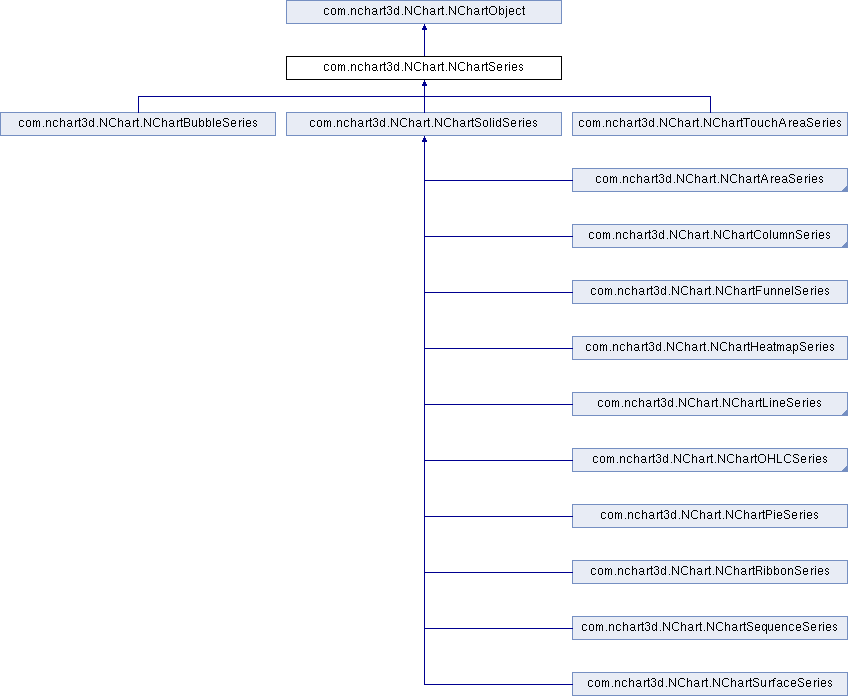
The NChartSeries class provides common methods for the series of the chart. More...
Public Member Functions | |
| NChartPoint[] | getPoints () |
| Array of points. | |
| Bitmap | getImage () |
| Image that is displayed in the legend. More... | |
| Bitmap | getDisabledImage () |
| Image that is displayed in the legend when the series is hidden (aka disabled). More... | |
| String | getName () |
| Name of the series. | |
| int | getNameColor () |
| Get color of the series name displayed in the legend. More... | |
| void | setNameColor (int color) |
| For details see getNameColor(). | |
| int | getDisabledNameColor () |
| Get color of the series name displayed in the legend when the series is hidden (aka disabled). More... | |
| void | setDisabledNameColor (int color) |
| For details see getDisabledNameColor(). | |
| float | getLegendMarkerSize () |
| Size of default series' marker in legend in pixels. More... | |
| void | setLegendMarkerSize (float legendMarkerSize) |
| For details see getLegendMarkerSize(). | |
| NChartBrushScale | getScale () |
| Brush scale of the series used to color the map. | |
| void | setScale (NChartBrushScale scale) |
| For details see getScale(). | |
| int | getTag () |
| Tag of the series. More... | |
| void | setTag (int tag) |
| For details see getTag(). | |
| boolean | isVisible () |
| Flag that determines if the series is visible or not. More... | |
| void | setVisible (boolean visible) |
| For details see isVisible(). | |
| boolean | getHostsOnSX () |
| Flag that determines if the series is hosted on the secondary X-axis. More... | |
| void | setHostsOnSX (boolean hostsOnSX) |
| For details see getHostsOnSX(). | |
| boolean | getHostsOnSY () |
| Flag that determines if the series is hosted on the secondary Y-axis. More... | |
| void | setHostsOnSY (boolean hostsOnSY) |
| For details see getHostsOnSY(). | |
| boolean | getHostsOnSZ () |
| Flag that determines if the series is hosted on the secondary Z-axis. More... | |
| void | setHostsOnSZ (boolean hostsOnSZ) |
| For details see getHostsOnSZ(). | |
| NChartSeriesDataSource | getDataSource () |
| Data source for the series. More... | |
| void | setDataSource (NChartSeriesDataSource dataSource) |
| For details see getDataSource(). | |
| NChartDataSmoother | getDataSmoother () |
| Data smoother used. More... | |
| void | setDataSmoother (NChartDataSmoother dataSmoother) |
| For details see getDataSmoother(). | |
| boolean | isForceAbsolute () |
| Flag that determines if the series forces absolute value axis. More... | |
| void | setForceAbsolute (boolean forceAbsolute) |
| For details see isForceAbsolute(). | |
| boolean | isPointSelectionEnabled () |
| Flag determining if the chart points can be selected by tap (true) or not (false). More... | |
| void | setPointSelectionEnabled (boolean pointSelectionEnabled) |
| For details see isPointSelectionEnabled(). | |
| boolean | isNeedsSeparateSums () |
| Flag determining if in the additive value axis mode (when valueAxesType = NChartValueAxesType.Additive) positive and negative values are added separately, so all positives are above zero and all negatives are below zero (true), or all the values are just added together (false). More... | |
| void | setNeedsSeparateSums (boolean needsSeparateSums) |
| For details see isNeedsSeparateSums(). | |
| boolean | isUpdateAllowed () |
| Flag providing a hint that the series has no modifications and should not be updated by the next NChart#rebuildSeries() or NChart#updateSeries() call (false) or it should be updated as normal (true). More... | |
| void | setUpdateAllowed (boolean updateAllowed) |
| For details see isUpdateAllowed(). | |
 Public Member Functions inherited from com.nchart3d.NChart.NChartObject Public Member Functions inherited from com.nchart3d.NChart.NChartObject | |
| boolean | isVisible () |
| Flag that determines if the object is visible or not. More... | |
| void | setVisible (boolean visible) |
| For details see isVisible(). | |
| NChart | getChart () |
| Chart the object belongs to. More... | |
Detailed Description
The NChartSeries class provides common methods for the series of the chart.
Member Function Documentation
|
inline |
|
inline |
Data source for the series.
- See also
- NChartSeriesDataSource
|
inline |
Image that is displayed in the legend when the series is hidden (aka disabled).
This property returns the image only if it was provided by the data source. If the default image is used, null is returned.
|
inline |
Get color of the series name displayed in the legend when the series is hidden (aka disabled).
If -1, the textColor from the legend is used. The default value is -1.
|
inline |
Flag that determines if the series is hosted on the secondary X-axis.
If true, it will be drawn according to the secondary X-axis, if false according to the normal X-axis. The secondary axis appears opposite the normal axis and is managed separately: it can have its own min and max; its own color settings and so on.
|
inline |
Flag that determines if the series is hosted on the secondary Y-axis.
If true, it will be drawn according to the secondary Y-axis, if false according to the normal Y-axis. The secondary axis appears opposite the normal axis and is managed separately: it can have its own min and max; its own color settings and so on.
|
inline |
Flag that determines if the series is hosted on the secondary Z-axis.
If true, it will be drawn according to the secondary Z-axis, if false according to the normal Z-axis. The secondary axis appears opposite the normal axis and is managed separately: can have its own min and max; its own color settings and so on.
|
inline |
Image that is displayed in the legend.
This property returns the image only if it was provided by the data source. If the default image is used, null is returned.
|
inline |
Size of default series' marker in legend in pixels.
The default value is 20.
|
inline |
Get color of the series name displayed in the legend.
If -1, the textColor from the legend is used. The default value is -1.
|
inline |
Tag of the series.
You may use it as you want.
|
inline |
Flag that determines if the series forces absolute value axis.
If true, the series is drawn as if value axes type would be absolute, even if it's not. If false, the series is drawn according to the actual value axes type set in Cartesian system. The default value is false. This property has effect for Cartesian system based series only. Otherwise it's ignored.
|
inline |
Flag determining if in the additive value axis mode (when valueAxesType = NChartValueAxesType.Additive) positive and negative values are added separately, so all positives are above zero and all negatives are below zero (true), or all the values are just added together (false).
The default value is true. Normally it's reasonable to separate the sums (so keep this flag in its default state), but sometimes you may want to preserve the series order when they are stacked on the additive axis. In this case you may want to toggle this flag to false.
|
inline |
Flag determining if the chart points can be selected by tap (true) or not (false).
The default value is true. If you do not want to select points by tap, it is better to disable selection, because it will save memory and boost the data updating. This property works in conjunction with pointSelectionEnabled of NChart allowing to fine-tune the point selection for individual series.
|
inline |
Flag providing a hint that the series has no modifications and should not be updated by the next NChart#rebuildSeries() or NChart#updateSeries() call (false) or it should be updated as normal (true).
The default value is true.
Let's imagine the situation when you have a heavy chart, say, a scatter of several millions of points, and a lightweight chart, say, a line of just a few points on top of that. According to your logic, you want to update the line, for example, changing its colour, and then you should use NChart#updateSeries(), or slightly changing its values, and then you should use NChart#rebuildSeries(). The scatter stays unchanged. But in both cases, the NChart#updateSeries() and NChart#rebuildSeries() calls will initiate the update process of both your series, which will take unnecessary long time. To prevent this, you can set
flag of the scatter series to false, and it will remain untouched improving the update performance.
Though, you have to be aware, that this flag is only a hint. In the end, NChart3D decides itself whether the series should be updated or not, because internally the series are combined in batches, and if one series of the batch is to be updated, while the other is not, the whole batch is going to be updated anyway.
Also, you should never set this flag to false before the first appearance of the series. So the good idea to operate is to set this flag right before the update call, and then revert it back to prevent unwanted side-effects.
|
inline |
Flag that determines if the series is visible or not.
The default value is "true".