The NChartCartesianSystem class provides methods for managing the chart's cartesian coordinate system. More...
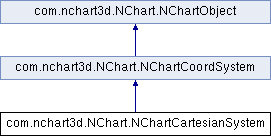
Public Member Functions | |
| NChartValueAxis | getXAxis () |
| X-axis of the cartesian coordinate system. More... | |
| NChartValueAxis | getSXAxis () |
| Secondary X-axis of the cartesian coordinate system. More... | |
| NChartValueAxis | getYAxis () |
| Y-axis of the cartesian coordinate system. More... | |
| NChartValueAxis | getSYAxis () |
| Secondary Y-axis of the cartesian coordinate system. More... | |
| NChartValueAxis | getZAxis () |
| Z-axis of the cartesian coordinate system. More... | |
| NChartValueAxis | getSZAxis () |
| Secondary Z-axis of the cartesian coordinate system. More... | |
| NChartAxesPlane | getXYPlane () |
| XY-axes plane of the cartesian coordinate system. More... | |
| NChartAxesPlane | getXZPlane () |
| XZ-axes plane of the cartesian coordinate system. More... | |
| NChartAxesPlane | getYZPlane () |
| YZ-axes plane of the cartesian coordinate system. More... | |
| NChartAxisGrid | getXAlongY () |
| Grid that goes from the X-axis along the Y-axis. More... | |
| NChartAxisGrid | getXAlongZ () |
| Grid that goes from the X-axis along the Z-axis. More... | |
| NChartAxisGrid | getSXAlongY () |
| Grid that goes from secondary the X-axis along the Y-axis. More... | |
| NChartAxisGrid | getSXAlongZ () |
| Grid that goes from secondary the X-axis along the Z-axis. More... | |
| NChartAxisGrid | getYAlongX () |
| Grid that goes from the Y-axis along the X-axis. More... | |
| NChartAxisGrid | getYAlongZ () |
| Grid that goes from the Y-axis along the Z-axis. More... | |
| NChartAxisGrid | getSYAlongX () |
| Grid that goes from secondary the Y-axis along the X-axis. More... | |
| NChartAxisGrid | getSYAlongZ () |
| Grid that goes from secondary the Y-axis along the Z-axis. More... | |
| NChartAxisGrid | getZAlongX () |
| Grid that goes from the Z-axis along the X-axis. More... | |
| NChartAxisGrid | getZAlongY () |
| Grid that goes from the Z-axis along the Y-axis. More... | |
| NChartAxisGrid | getSZAlongX () |
| Grid that goes from secondary the Z-axis along the X-axis. More... | |
| NChartAxisGrid | getSZAlongY () |
| Grid that goes from secondary the Z-axis along the Y-axis. More... | |
| NChartCartesianPlanesIntersectionCoord | getPlanesIntersectionCoordX () |
| X-Coordinate of the planes intersection point. | |
| NChartCartesianPlanesIntersectionCoord | getPlanesIntersectionCoordY () |
| Y-Coordinate of the planes intersection point. | |
| NChartCartesianPlanesIntersectionCoord | getPlanesIntersectionCoordZ () |
| Z-Coordinate of the planes intersection point. | |
| NChartValueAxesType | getValueAxesType () |
| Type of axes. More... | |
| void | setValueAxesType (NChartValueAxesType valueAxesType) |
| For details see getValueAxesType(). | |
| boolean | isBorderVisible () |
| Flag that determines if the border around the cartesian coordinate system is visible (true) or not (false). | |
| void | setBorderVisible (boolean borderVisible) |
| For details see isBorderVisible(). | |
| int | getBorderColor () |
| Color of the border around the cartesian coordinate system. | |
| void | setBorderColor (int borderColor) |
| For details see getBorderColor(). | |
| float | getBorderThickness () |
| Thickness of the border around the cartesian coordinate system. | |
| void | setBorderThickness (float borderThickness) |
| For details see getBorderThickness(). | |
| void | addCrosshair (NChartCrosshair crosshair) |
| Add crosshair to the cartesian system. More... | |
| void | removeCrosshair (NChartCrosshair crosshair) |
| Remove crosshair from the cartesian system. More... | |
| void | removeAllCrosshairs () |
| Remove all crosshairs from the cartesian system. | |
| void | updateCrosshairs () |
| Force crosshairs to be updated. More... | |
| boolean | shouldAutoZoom () |
| Flag determining if auto zoom mode is on (true), or off (false). More... | |
| void | setShouldAutoZoom (boolean shouldAutoZoom) |
| For details see shouldAutoZoom(). | |
| NChartAutoZoomAxes | getAutoZoomAxes () |
| The axes kind (normal, secondary or both) to be auto-zoomed. More... | |
| void | setAutoZoomAxes (NChartAutoZoomAxes autoZoomAxes) |
| For details see getAutoZoomAxes(). | |
 Public Member Functions inherited from com.nchart3d.NChart.NChartCoordSystem Public Member Functions inherited from com.nchart3d.NChart.NChartCoordSystem | |
| abstract NChartMargin | getMargin () |
| Margin of the coordinate system. | |
| abstract void | setMargin (NChartMargin margin) |
| For details see getMargin(). | |
| Public Member Functions inherited from com.nchart3d.NChart.NChartObject | |
| boolean | isVisible () |
| Flag that determines if the object is visible or not. More... | |
| void | setVisible (boolean visible) |
| For details see isVisible(). | |
| NChart | getChart () |
| Chart the object belongs to. More... | |
Detailed Description
The NChartCartesianSystem class provides methods for managing the chart's cartesian coordinate system.
Member Function Documentation
|
inline |
Add crosshair to the cartesian system.
- Parameters
-
crosshair - crosshair to add.
- See also
- NChartCrosshair
|
inline |
The axes kind (normal, secondary or both) to be auto-zoomed.
The default value is NChartAutoZoomNormalAxis. The axes set to be auto-zoomed are zoomed by panning so that the visible part of the chart is fit to the plot area, if shouldAutoZoom() is true. If axes are not swapped (you are not using bar series), the axes to zoom are Y and SY. In other case, they are X and SX. This property takes effect in 2D mode only. It is strongly recommended to disable the user interactions related to the direction of the axes which should be zoomed automatically. For example, if you set autoZoomAxes to NChartAutoZoomAxes.NormalAxis, and the axis are not swapped (you are not using bar series, so the axes to zoom are Y and SY), you are recommended to disable proportional zoom, vertical zoom and vertical pan: m_view.getChart().setUserInteractions((m_view.getChart().getUserInteractionMode()) ^ (NChartUserInteraction.ProportionalZoom | NChartUserInteraction.VerticalZoom | NChartUserInteraction.VerticalMove));, as well as to set the NChart#setZoomMode(NChartZoomMode) to directional: m_view.getChart().setZoomMode(NChartZoomMode.Directional); See also NChartAutoZoomAxes.
|
inline |
Grid that goes from secondary the X-axis along the Y-axis.
- See also
- NChartAxisGrid
|
inline |
Grid that goes from secondary the X-axis along the Z-axis.
- See also
- NChartAxisGrid
|
inline |
Secondary X-axis of the cartesian coordinate system.
- See also
- NChartValueAxis
|
inline |
Grid that goes from secondary the Y-axis along the X-axis.
- See also
- NChartAxisGrid
|
inline |
Grid that goes from secondary the Y-axis along the Z-axis.
- See also
- NChartAxisGrid
|
inline |
Secondary Y-axis of the cartesian coordinate system.
- See also
- NChartValueAxis
|
inline |
Grid that goes from secondary the Z-axis along the X-axis.
- See also
- NChartAxisGrid
|
inline |
Grid that goes from secondary the Z-axis along the Y-axis.
- See also
- NChartAxisGrid
|
inline |
Secondary Z-axis of the cartesian coordinate system.
- See also
- NChartValueAxis
|
inline |
Type of axes.
You may use additional and percent axes only if you provide ticks for category axes. For example, if you are about to display additional columns, you should provide ticks for the X and Z axes. If you are about to display additional bars, you should provide ticks for Y and Z axes respectively (because bars are stretched along the X-axis). If you didn't provide ticks for category axes, changing the type to additional or percent takes no effect for the series displayed even though states of their points are aligned to the grid (see NChartPointState for details).
- See also
- NChartValueAxesType
|
inline |
Grid that goes from the X-axis along the Y-axis.
- See also
- NChartAxisGrid
|
inline |
Grid that goes from the X-axis along the Z-axis.
- See also
- NChartAxisGrid
|
inline |
X-axis of the cartesian coordinate system.
- See also
- NChartValueAxis
|
inline |
XY-axes plane of the cartesian coordinate system.
- See also
- NChartAxesPlane
|
inline |
XZ-axes plane of the cartesian coordinate system.
- See also
- NChartAxesPlane
|
inline |
Grid that goes from the Y-axis along the X-axis.
- See also
- NChartAxisGrid
|
inline |
Grid that goes from the Y-axis along the Z-axis.
- See also
- NChartAxisGrid
|
inline |
Y-axis of the cartesian coordinate system.
- See also
- NChartValueAxis
|
inline |
YZ-axes plane of the cartesian coordinate system.
- See also
- NChartAxesPlane
|
inline |
Grid that goes from the Z-axis along the X-axis.
- See also
- NChartAxisGrid
|
inline |
Grid that goes from the Z-axis along the Y-axis.
- See also
- NChartAxisGrid
|
inline |
Z-axis of the cartesian coordinate system.
- See also
- NChartValueAxis
|
inline |
Remove crosshair from the cartesian system.
- Parameters
-
crosshair - crosshair to remove.
- See also
- NChartCrosshair
|
inline |
Flag determining if auto zoom mode is on (true), or off (false).
The default value is false. In auto zoom mode, the axis set to be auto-zoomed by the setAutoZoomAxes(NChartAutoZoomAxes) property is zoomed automatically so that the visible part of the chart is fit to the plot area. This property takes effect in 2D mode only.
|
inline |
Force crosshairs to be updated.
Use this method if you changed values of crosshairs and want to apply them without calling updateData of the chart. If crosshairs are the only changed chart items, this is much more efficient way to make the changes visible than updating entire chart.